3D Printed AirPods Case: What to Check for Fit, Charging Access and Layer Lines
Check AirPods 1&2 compatibility, lid movement, charging-port access, raised details and normal PLA layer lines before approving a custom case.
Published July 30, 2026
Table of Contents
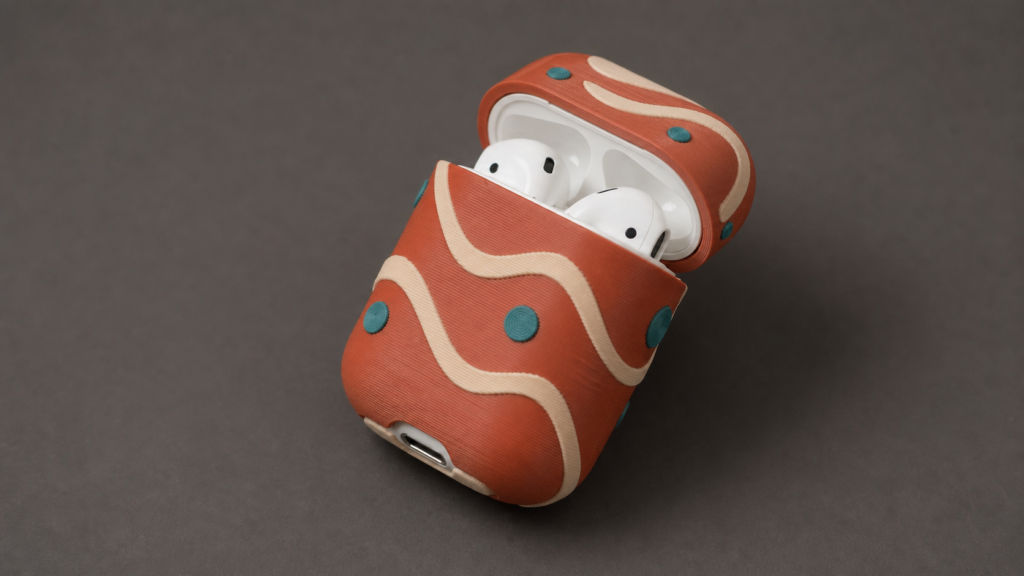
Before ordering a 3D printed AirPods case, check the supported model, how the cover attaches, whether the lid and charging port remain accessible, and what the printed surface will look like. This custom cover supports AirPods 1&2 only. It snaps on, preserves lid and charging-port access, and uses a raised 3D design printed in PLA. Normal layer lines can vary with design complexity.
Confirm model support before discussing the design
Fit starts with model compatibility. The listing is specifically for AirPods 1&2. It does not state support for other models. Therefore, confirm your model in the first message rather than waiting until the design stage.
This check matters because the custom conversation includes more than appearance. You will send the model together with a photo, artwork, or design idea. You can also provide a preferred style, colors, a name or text, and areas that must remain unobstructed. A complete request connects the creative plan with the correct case format.
What “snaps on” tells you
The product description says the PLA cover snaps on. That is the stated attachment method. It also describes PLA as lightweight and durable. However, those points should not be expanded into assumptions about impacts, water, heat, or other conditions that the listing does not address.
Instead, keep the buying decision tied to the facts provided. Confirm the supported model. Review the planned shape. Then use the design preview before print to check that the custom relief matches the agreed direction.
Check lid and charging-port access
A decorative cover still needs to respect the parts you use. This design allows access to the lid and charging port. In your brief, identify those areas as spaces that must stay unobstructed. If your idea places raised elements near them, mention that early.
The same rule applies to any other area that matters to your concept. Tell the designer what must stay clear instead of assuming the reference image communicates it. Clear notes are especially useful when the design includes a large subject, projected shapes, or text near an opening.
- State “AirPods 1&2” in the request.
- Mark lid access as an unobstructed area.
- Mark charging-port access as an unobstructed area.
- Flag any special placement request before ordering.
- Check those points again in the design preview.
Understand normal layer lines
A 3D printed object is built in layers. As a result, surface layer lines are normal on this case. Their visibility and appearance can vary with the complexity of the design. A detailed raised subject may not present the surface in exactly the same way as a simpler relief.
This is an important purchase-readiness point. Sample images are examples, so they should not be treated as a guarantee that every custom design will have identical shapes or surface appearance. Your chosen reference and the complexity of the planned design will influence the individual result.
Review the preview for design, not an imaginary smooth finish
The pre-print preview helps you review the proposed subject, relief, colors, and placement. Use it to confirm whether the design reflects your request. At the same time, remember that the final item is 3D printed, so normal layer lines remain a stated characteristic of the process.
If you have a special request related to design complexity or a visible feature, discuss it before ordering. Do not wait until after production to introduce a requirement that was absent from the brief.
If the model and access details match your needs, see the Custom Cute 3D Printed AirPods Case Cover for AirPods 1&2. Send your model, reference, style, colors, optional text, and unobstructed-area notes to start the custom process.
Use a purchase-readiness checklist
A short checklist can separate confirmed product facts from personal expectations. Before ordering, make sure every answer below works for your intended use.
- Model: Are you ordering for AirPods 1&2?
- Attachment: Are you comfortable with a cover that snaps on?
- Access: Have you clearly identified the lid and charging port as unobstructed areas?
- Material: Does the stated lightweight, durable PLA description address what you need without adding unstated expectations?
- Surface: Do you understand that layer lines are normal and vary with design complexity?
- Customization: Have you supplied the reference, style, colors, name or text, and important clear areas?
- Approval: Are you ready to examine the design preview before print?
Separate fit questions from creative planning
Fit and access determine whether this listing is suitable. The creative brief determines what the raised design should communicate. Keeping those decisions separate makes both easier. First verify AirPods 1&2, snap-on attachment, and access points. Then refine the subject, style, colors, and text.
For help developing that second part, read how to plan a custom AirPods case from a photo or original idea. It covers focal points, reference choices, and preview feedback. With the fit facts settled and the brief prepared, you can approach the order with clearer expectations.
Best selling products

Custom 3D Miniature Figure from Photo – Personalized Mini Me Figurine
Price range: $49.00 through $499.00Personalized 3D Chibi Figurines From Photos of People or Pets
Price range: $49.00 through $499.00Custom Realistic Mini Me Figurine from Photo – Full Color 3D Portrait
Price range: $49.00 through $499.00Colnago Y1RS Road Bike Model – Rainbow Colors
Price range: $159.00 through $399.00
FAQ
Everything to know.
A few quick answers before you customize your Figurine here.
Can’t find your answer? Talk to a real person
For best likeness, upload 3-8 clear photos: front view, side view, outfit details, hairstyle, accessories, and any pose references you want us to follow.
Yes. We send a 3D preview before production. You can request reasonable adjustments to likeness, pose, outfit, base details, or accessories before approval.
Standard orders require 5–10 business days for processing, including reference review, 3D modeling, customer preview and approval, 3D printing, hand finishing, quality checking, and packaging. Tracked shipping then takes 5–7 business days. The total estimated delivery time is 10–17 business days. Day 1 begins on the first business day after payment and complete usable references are received. Delayed approval or extra revisions can extend the estimate. See our Shipping & Delivery Policy.
Yes. We can create people, pets, couples, family groups, anime-inspired styles, gaming avatars, wedding pieces, and memorial gifts from the references you provide.
We will work with what you have, but clearer references always improve likeness. If key details are missing, our team may ask for additional photos before sculpting.
Yes. Add notes during the order for pose, outfit, colors, accessories, base style, nameplate text, or special details you want included.
Figurines are 3D printed and hand finished. Final texture, color, and detail treatment vary by size, style, and the references used for the piece.
We aim for a recognizable, polished likeness, but a handmade 3D figurine is an artistic interpretation. Photos, lighting, hair, fabric, and scale can affect the final result.
Changes are easiest before approval. Once production starts, edits may be limited or require extra time and cost depending on how far the piece has progressed.
Contact us with photos of the packaging and damaged area as soon as possible. We will review the issue and help with a suitable resolution.
Yes. Figmo uses tracked international delivery services. Standard transit takes 5–7 business days after the 5–10 business day processing stage. The exact shipping charge is shown at checkout or confirmed in your written quote before payment. Customs processing may extend the estimate.
Yes. Multiple copies are useful for weddings, family gifts, teams, and memorial keepsakes. Share the quantity
you need so we can confirm timing and pricing.
Latest Posts
- Christmas Gifts for Pet Lovers: 3D Photo Keepsake Guide
 Compare photo-based 3D pet keepsakes by how they are worn or displayed, what reference photos help, and when to plan a Christmas order.
 - Group Gifts for Coworkers: Plan One Personal Keepsake
 A practical way to coordinate one personalized gift from a team, from agreeing on the total budget to choosing a photo and sending one clear customization brief.
 - First Christmas Together Gifts: A Photo Keepsake GuideMark your first Christmas together with a photo-based keepsake that fits your relationship, your shared memories, and the place where it will be displayed.